Plotting
Overview
Teaching: 15 min
Exercises: 15 minQuestions
How can I plot my data?
How can I save my plot for publishing?
Objectives
Create a scatter plot showing relationship between two data sets.
matplotlib is the most widely used scientific plotting library in Python.
- Commonly use a sub-library called
matplotlib.pyplot. - The Jupyter Notebook will render plots inline if we ask it to using a “magic” command.
%matplotlib inline
import matplotlib.pyplot as plt
- Simple plots are then (fairly) simple to create.
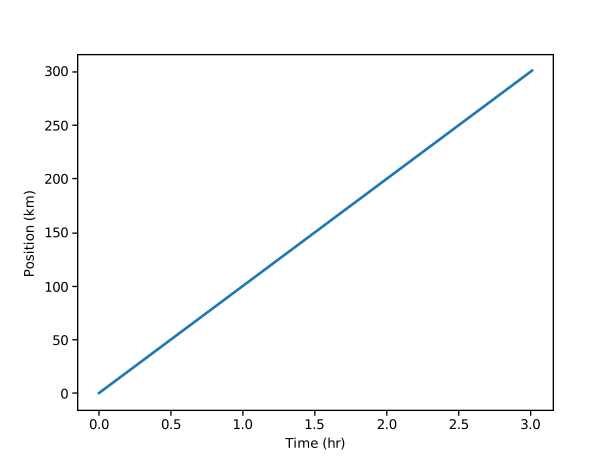
time = [0, 1, 2, 3]
position = [0, 100, 200, 300]

plt.plot(time, position)
plt.xlabel('Time (hr)')
plt.ylabel('Position (km)')
Saving your plot to a file
If you are satisfied with the plot you see you may want to save it to a file, perhaps to include it in a publication. There is a function in the matplotlib.pyplot module that accomplishes this: savefig. Calling this function, e.g. with
plt.savefig('my_figure.png')will save the current figure to the file
my_figure.png. The file format will automatically be deduced from the file name extension (other formats are pdf, ps, eps and svg).Note that functions in
pltrefer to a global figure variable and after a figure has been displayed to the screen (e.g. withplt.show) matplotlib will make this variable refer to a new empty figure. Therefore, make sure you callplt.savefigbefore the plot is displayed to the screen, otherwise you may find a file with an empty plot.
Making your plots accessible
Whenever you are generating plots to go into a paper or a presentation, there are a few things you can do to make sure that everyone can understand your plots.
- Always make sure your text is large enough to read. Use the
fontsizeparameter inxlabel,ylabel,title, andlegend, andtick_paramswithlabelsizeto increase the text size of the numbers on your axes.- Similarly, you should make your graph elements easy to see. Use
sto increase the size of your scatterplot markers andlinewidthto increase the sizes of your plot lines.- Using color (and nothing else) to distinguish between different plot elements will make your plots unreadable to anyone who is colorblind, or who happens to have a black-and-white office printer. For lines, the
linestyleparameter lets you use different types of lines. For scatterplots,markerlets you change the shape of your points. If you’re unsure about your colors, you can use Coblis or Color Oracle to simulate what your plots would look like to those with colorblindness.
Key Points
matplotlibis the most widely used scientific plotting library in Python.Can plot many sets of data together.