Running scripts and importing your own functions
Overview
Teaching: 20 min
Exercises: 0 minQuestions
How do I run scripts from the command line?
Hopw do I import my own functions as modules?
Objectives
Converting programs to script files and run them.
Reuse your own code by importing it as a module.
There are multiple ways of running Python code and programs. Besides running Python in Jupyter Notebooks many people will create scripts, i.e., stand-alone text files with Python code. We will do this on JupyterHub first. Those interested can install Python on their own computer and run either Jupyter Notebooks or stand-alone scripts.
Create a script file in JupyterHub and run it
Create an empty notebook with one codecell with the following program:
from datetime import datetime
print(datetime.now())
Try it out, you should see the current date and time.
Save the notebook with Now as the name
Next, in the Notebook browser window, click on the ‘New’ and select ‘Terminal’. NOTE make sure you do this in the same folder as where your Now.ipynb notebook is stored.
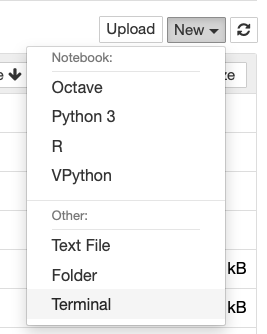
The terminal accepts commands and executes them immediately after you press the ‘return’ key. It is a so-called Unix Shell, to be precise, the bash shell. We won’t cover many command, only those we need to convert our Now.ipynb notebook to a stand-alone Python script and to execute it using Python.
First, we need to navigate to the folder containing the Now.ipynb notebook. The command ls will show all files and folder, as you would see them in the Notebook browser. You may need to navigate to the MBV3070 folder. Do this with
cd MBV3070
The command ls should now show you all files and folder, including the Now.ipynb file, which is your Now notebook.
jupyter-nbconvert --to python Now.ipynb
python my_book.py
This should result in the output in the terminal window with the current date and time.
Getting input from the command line
Create an empty notebook that is called “sys-test.py”. Put the following content into it:
import sys
print(sys.argv)
for element in sys.argv:
    print(element)
print(sys.argv[1])
Run the commands shown below on the command line:
- python sys-test.py 1
- python sys-test first second
- python sys-test.py 1 2 3 4
- python sys-test.py
Question: can you figure out why the last one fails?
Import functions from script files
Let’s write a very simple function in a new python script file:
- select ‘New’ –> ‘Text file’
- change the name to
my_functions.py: - write in this function:
def average(values):
    if len(values) == 0:
        return None
    return sum(values) / len(values)
Note how we get Python syntax highlighting and automatic indentation in the text editor from Jupyter.
On the terminal, in the folder where you saved my_functions.py, try running your script:
python my_functions.py
Nothing happens. If we want to use the script we can import the function in a Jupyter Notebook or in another script. Try both approaches with these lines of Python:
from my_functions import average
print(average([1, 2, 5]))
Now see what happens if we add some code at the end of the my_functions.py file to test the script:
print("testing the script with 3, 7 and 10:")
print(average([3, 7, 10]))
Now:
- run the script from the command line
- rerun the code that imports the function and uses it on
[1, 2, 5]. NOTE in the Notebook, you will have to restart the kernel to force a new import.
You’ll see that each import runs the testing line. This is not a bug but a feature - Python will execute any commands in a python script file when importing functions from it.
Dual usage of script files
This is why you will often see the following construct at the end of script files:
if __name__ == "__main__":
    # run some code using functions from the file
Let’s adjust our my_functions.py file accordingly and test again:
def average(values):
    if len(values) == 0:
        return None
    return sum(values) / len(values)

if __name__ == "__main__":
    print("testing the script with 3, 7 and 10:")
    print(average([3, 7, 10]))
Check the import in the Notebook (after a kernel restart) and as follows on the command line:
python test_my_functions.py
2.6666666666666665
python my_functions.py
So, to be able to combine functions and running these functions in a script, with importing functions from that script elsewhere, build up the script file as follows:
def function1(argument1, argument2):
    # do something
    # return something

def function2(argument):
    # do something
    # return something

if __name__ == "__main__":
    # run some code using function1 and/or function2
Key Points
There are multiple ways to run programs.